
Why create custom labels to group shots in Baselight Editions?
Technique: Custom setup labels
In short
- Custom labels
- Reel or other empty column
- Works with
- Multi-Apply + Navigation Filter
- Best for
- Multiple camera setups under one source label
Give each camera setup its own custom label in the Reel column. Use them for Navigation and Multi-Apply filters in Editions.
On an unscripted home renovation series, a shoot day will have multiple setups: outside for OTF interviews, inside the house moving from room to room with the hosts, then backtracking later in the day for b-roll. All of that can come into your edit system under one tape name or disk label, probably with some unique clip names from starts and stops in recording. I find it beneficial to create custom labels that add a level of granularity when using the Navigation and Multi-Apply filters in Editions.
How do you set up the labels?
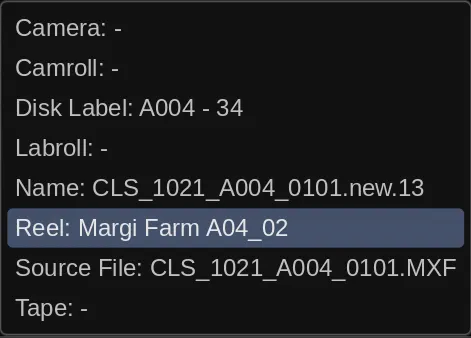
In Media Composer, I skim my sorted sequence one source at a time and pick out the shots that belong to the first camera setup: a group of shots that can start from the same grade. A change in location or lighting influences these decisions. In the bin, I give those master clips the same Reel name, for example “Cam A Day 03_01”. When the setup changes, the next group gets “Cam A Day 03_02”, and so on.
When it’s time to grade, I set Match to Reel and use Multi-Apply to copy a grade to every other shot with the same label. With the Navigation Filter also set to Reel, I can jump between them. Every shot in that setup can now be found and graded together, even once they’re scattered across the locked cut. It’s a huge time saver. The Reel column is usually empty. If it isn’t, I pick a different empty column from the list of available Navigation and Multi-Apply filters in Editions.
Where does this come from?
Back in the tape days, it was common to give master clips names that meant something, not just a string of letters and numbers. It was also pretty common to make subclips, named for what was happening in the shot.
The switch to camera files in place of tape sped things up considerably as ingest, transcoding and consolidation replaced real-time capture. But clips now arrive already named in camera, and it became a little dangerous to rename them as a means of organization and identification.
This brings back a little of that old-school sensibility, and puts it to work in Editions.